A complete digital system for your café, restaurant or pizzeria
A website, a QR menu on every table, orders and waiter calls, bookings confirmed on WhatsApp, staff rotas and delivery with driver tracking. All on your own domain, in one admin panel, for a monthly subscription.
from €69/ month
Three packages: Start €69, System €125 and System with delivery €179 a month
Google Business Profile and SEO are included in every package.
Payment starts only after you approve the launch. Minimum term 12 months, 30 days’ notice. Subscription terms
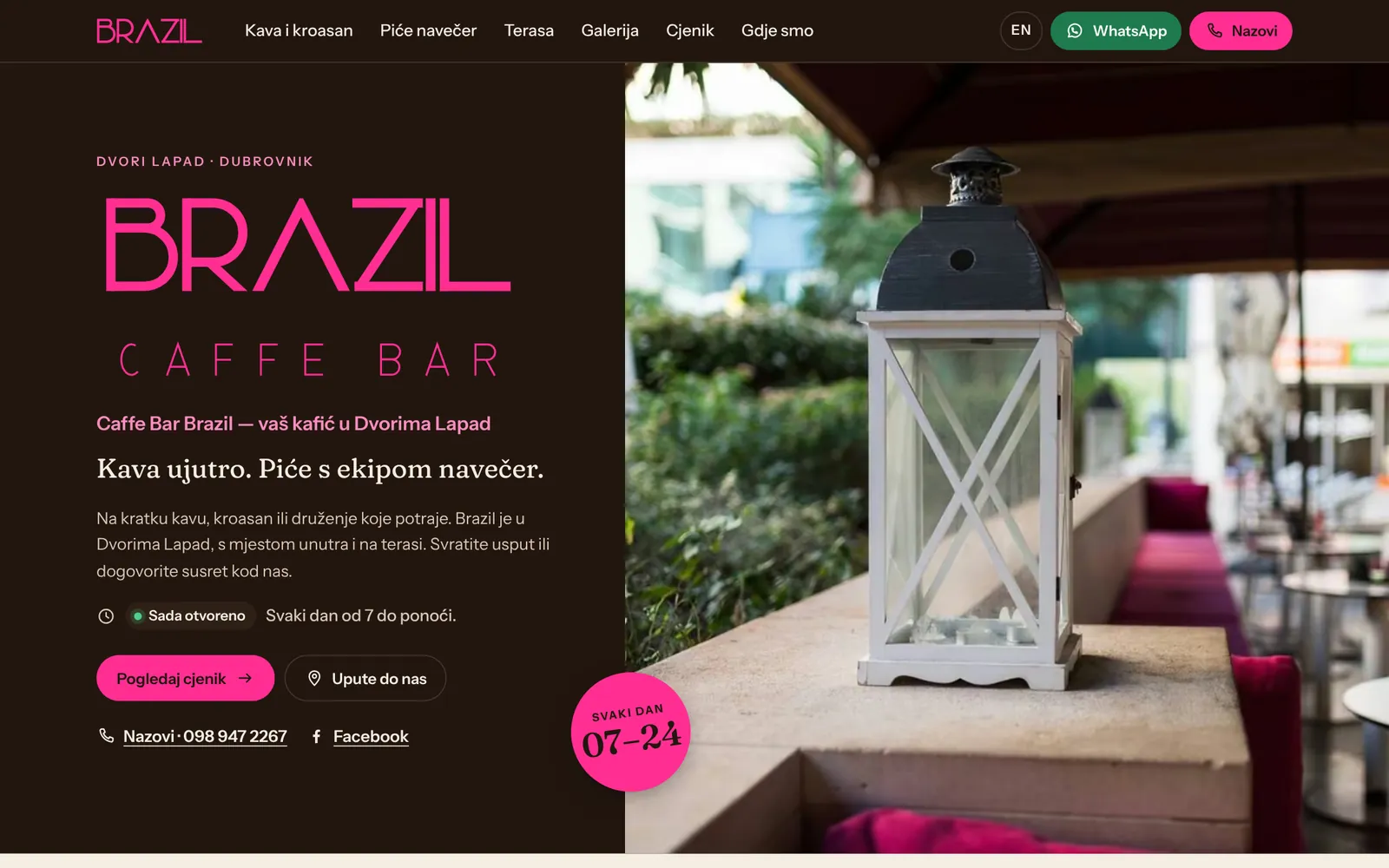
Pilot project: Caffe Bar Brazil, Dvori Lapad, Dubrovnik
PACKAGES AND PRICES
Choose your package
Every package includes a website on your domain, a Google Business Profile and SEO. They differ in the tools for your venue and delivery. You can switch packages as your business grows.
Start
€69/ month
For cafés and smaller restaurants that want a good website and more guests from Google.
Website on your domain, info@ email, hosting and HTTPS
Up to three languages
Menu on the website and a QR menu for tables
Bookings confirmed on WhatsApp
Google Business Profile: setup, editing and one post a month
SEO: local and technical SEO, descriptions and page structure
Prices are monthly. Payment starts only after you approve the launch. Google Ads, hardware and online card payment fees are not included.
ONE SYSTEM
What you get
These are all the tools in the System and System with delivery packages. Start includes the website, QR menu, bookings, Google profile and SEO.
A website on your domain
Menu, gallery, opening hours, map and contact in up to three languages. Domain, info@ email, hosting, HTTPS and maintenance are included.
QR menu and table ordering
Every table has its own QR code. Guests scan, pick drinks or dishes, send the order and follow its status. No app to install.
Call a waiter and the bill
Two buttons on the table page. A bar with the table number lights up in the admin with a sound, and the waiter comes when the guest needs them.
Bookings confirmed on WhatsApp
A form with required details and the country dialling code. One click confirms and sends the guest a WhatsApp message in their language, plus a reminder the day before.
Floor plan
Bookings are linked to tables. For any day and time you see which tables are taken, where an order is in progress and who wants the bill.
Items and labels
When something runs out, switch it off with one click and guests cannot order it. New, House favourite, Seasonal and Alcohol-free labels show at once.
Staff rota
A weekly shift table: morning, mid shift, afternoon, day off, holiday. Day by day on a phone, with a warning when a shift has nobody.
Printing at the bar and kitchen
New orders print by themselves on an 80 mm thermal printer, with the table number, items and note. For rush hours when nobody can watch the screen.
Match schedule
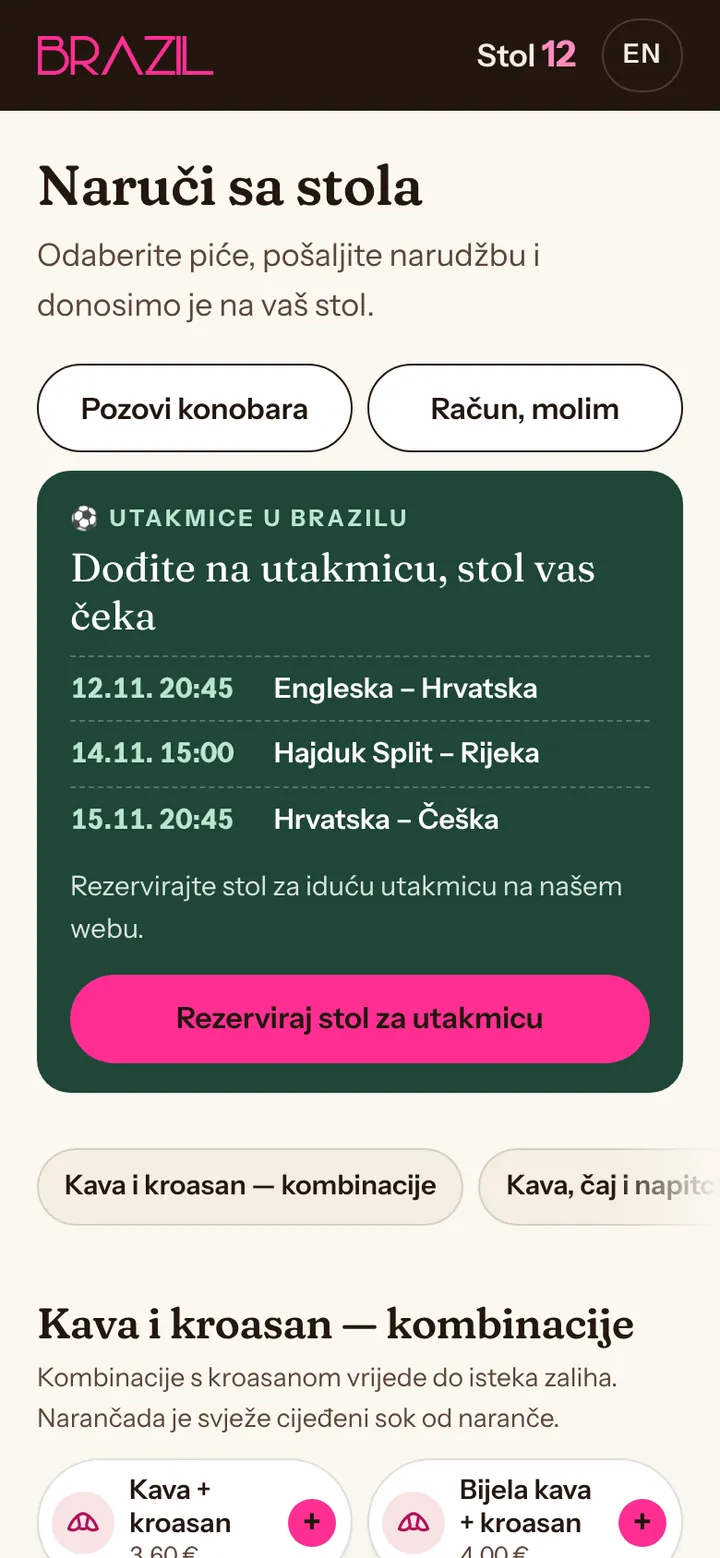
For sports bars: the schedule of major matches updates itself, and every match has a button to book a table.
Google profile, SEO and blog
A tidy Google Business Profile, posts for events, review replies by agreement and one blog post a month. Guest reviews on your website.
Legal pages and privacy
Privacy policy, cookies and legal notice in Croatian and English, written for what the system actually does. Personal data is deleted automatically.
Admin on phone and computer
One admin panel for the bar, the floor and the owner. Password login, a sound for new orders, works on a tablet, phone or computer.
A REAL PROJECT
What it looks like in practice
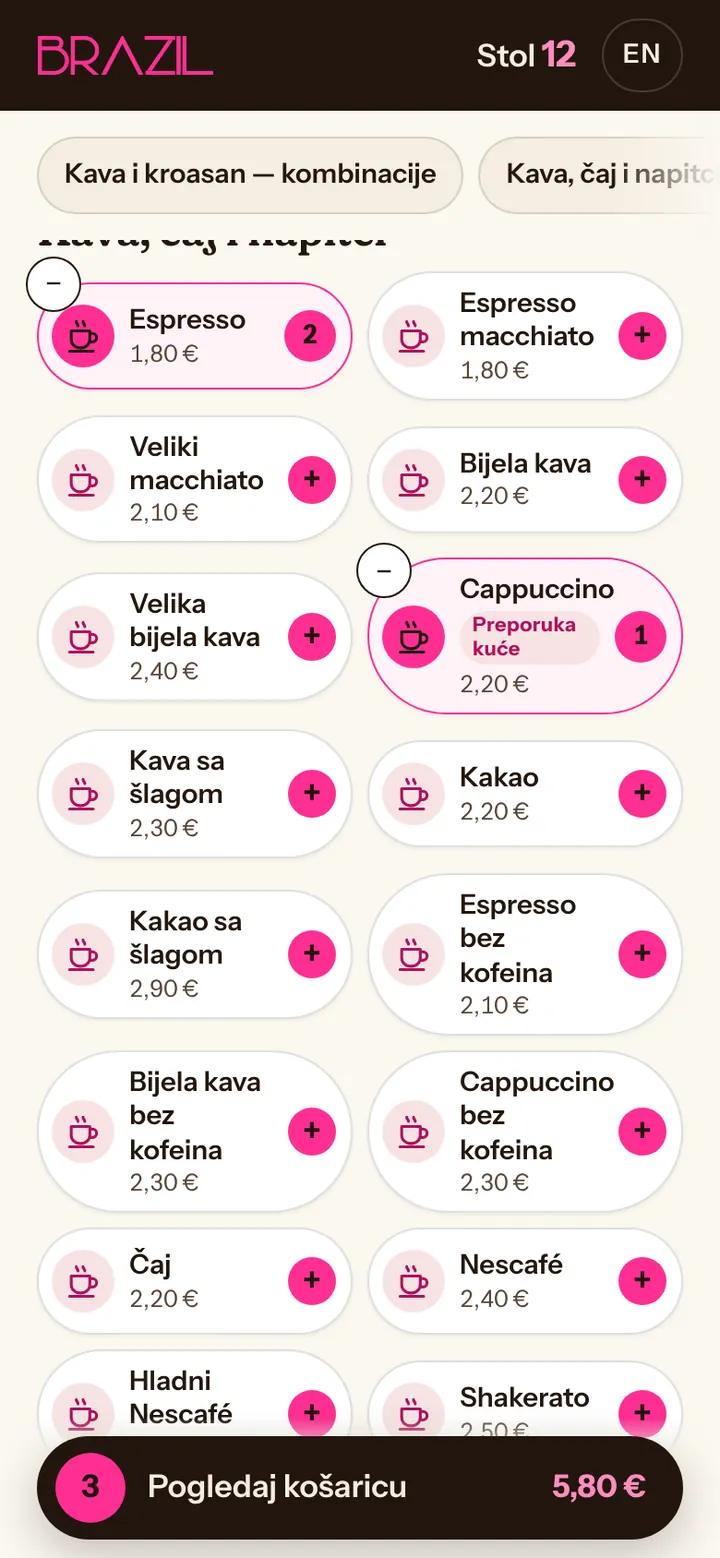
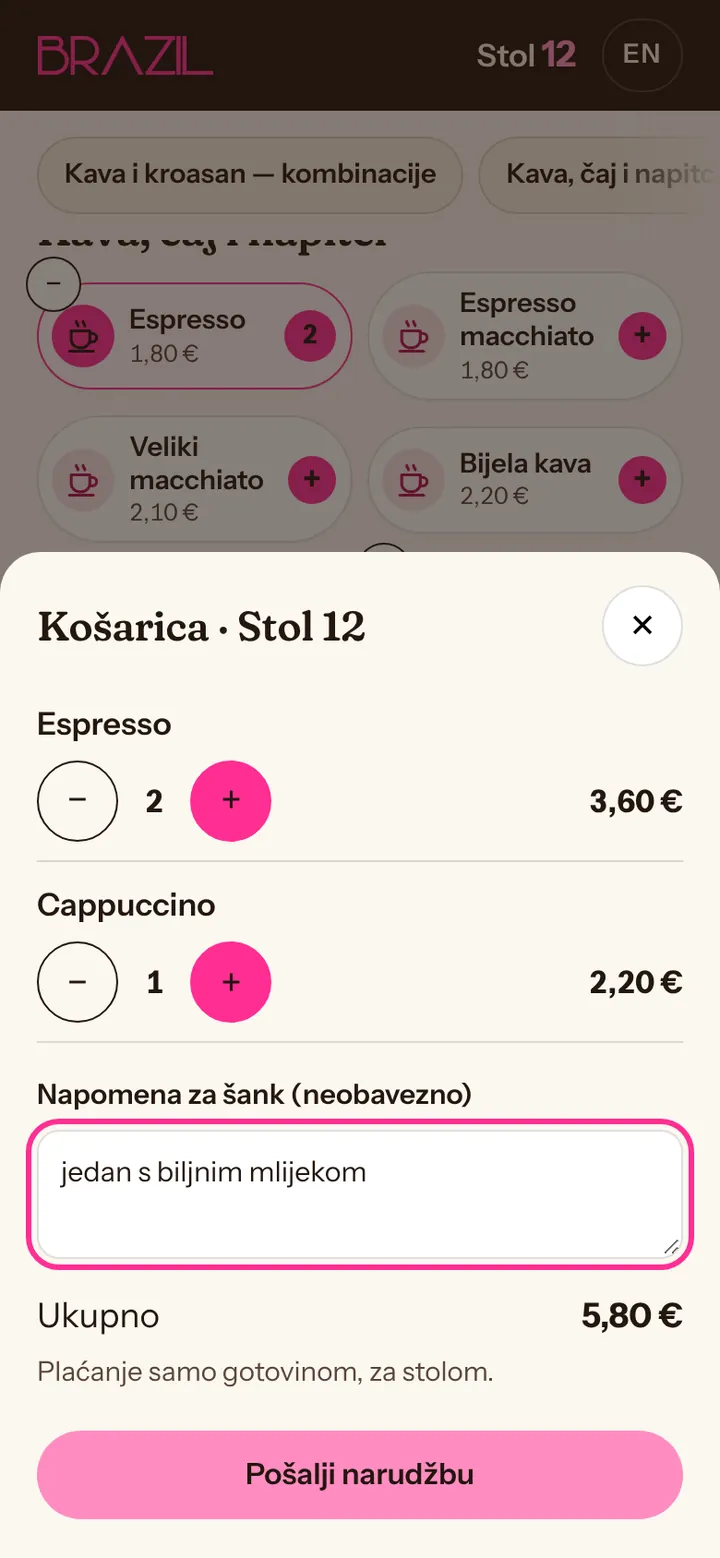
Screenshots from the pilot project for Caffe Bar Brazil in Dubrovnik, with sample data instead of real guests.
For guests
Scan the code on the table and order
The menu is shown as pills with category icons, prices and labels. Guests add items, write a note for the bar and send. The language adapts to their phone.
No app and no sign-up
The code works only for that table
Order status: received, being prepared, served
For the bar
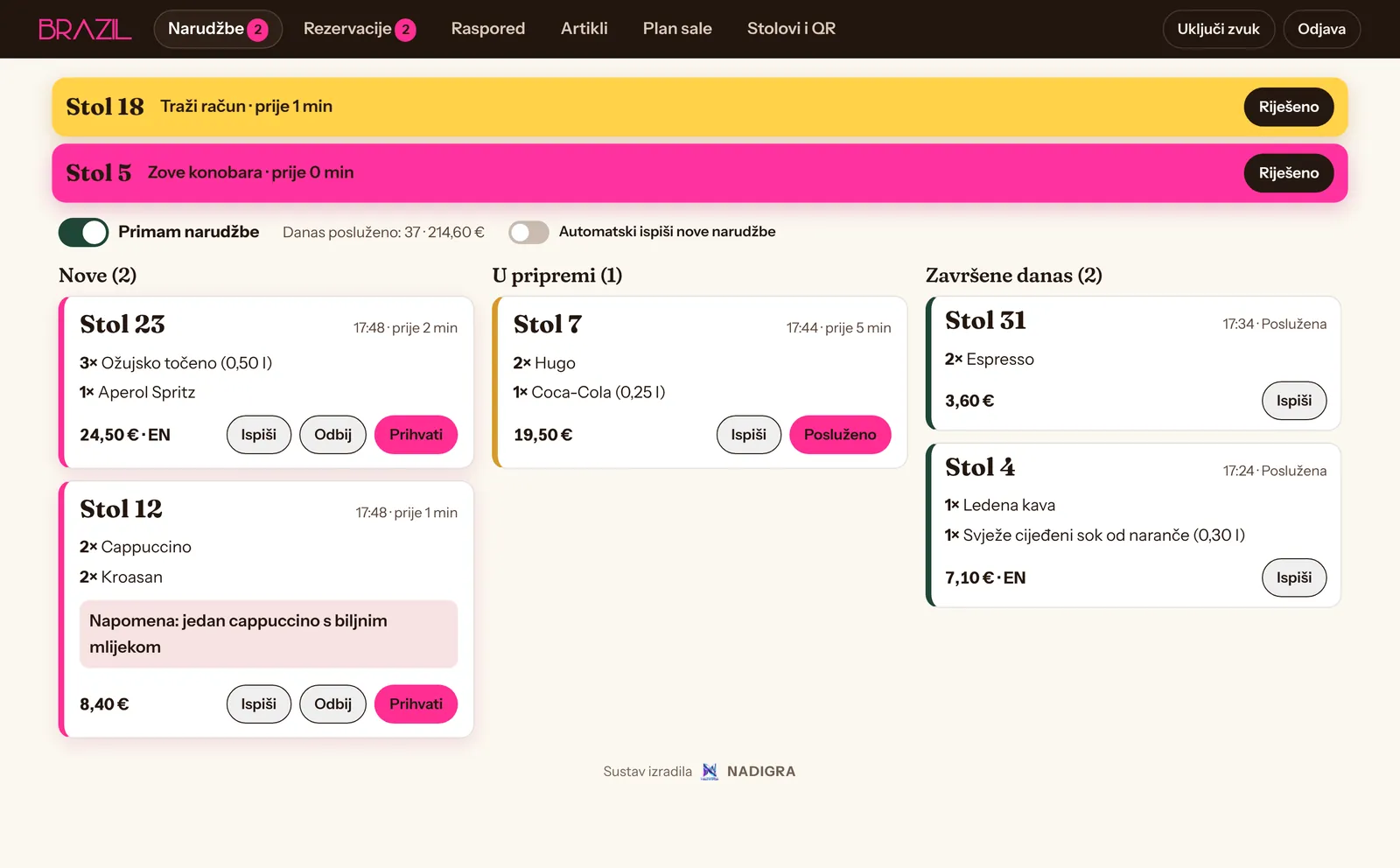
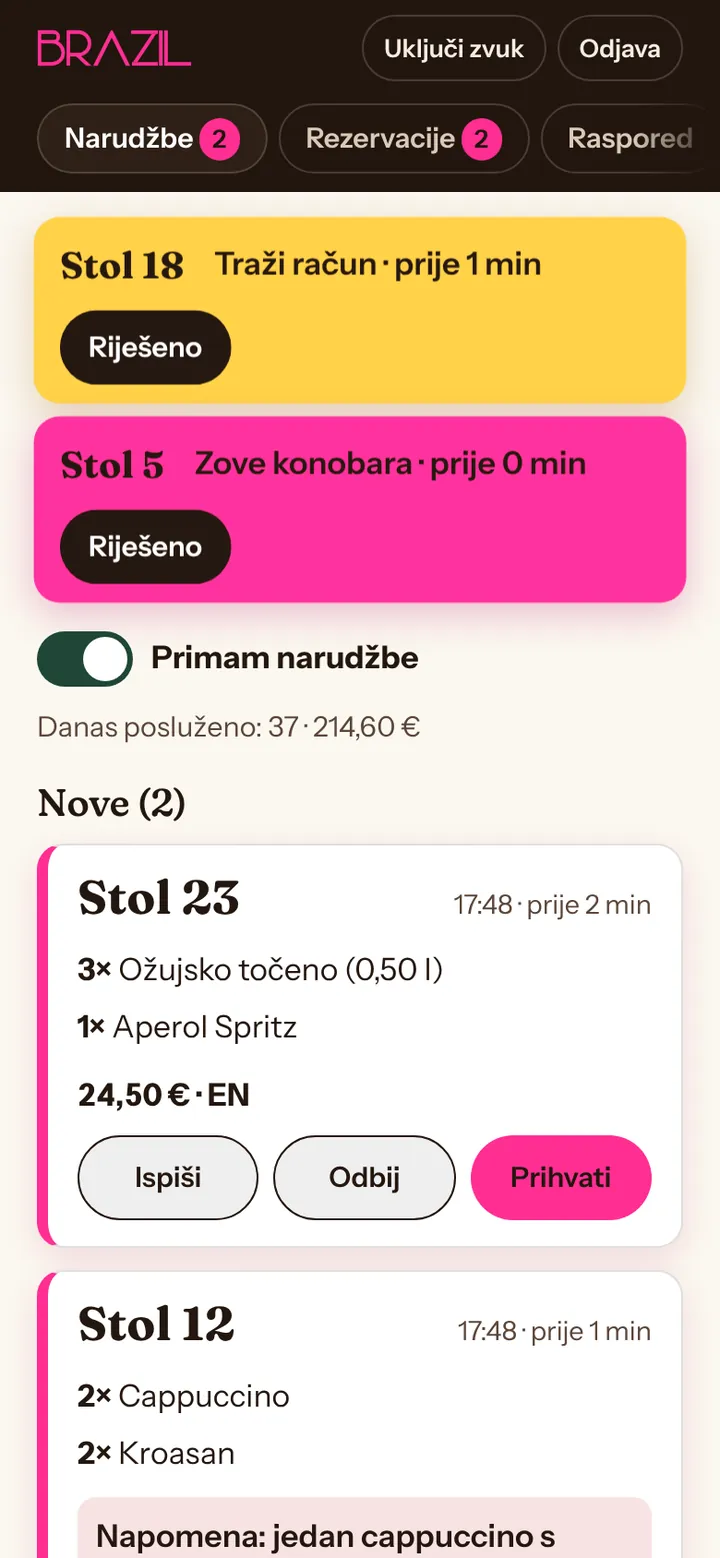
Orders and calls arrive on one screen
New orders, those being prepared and those finished today, each with a table number. Waiter calls and bill requests light up at the top until someone deals with them.
A sound and vibration for every new order
Accept, Served or Decline with one tap
The day's takings in the same view
brazildvori.com/admin
Bookings
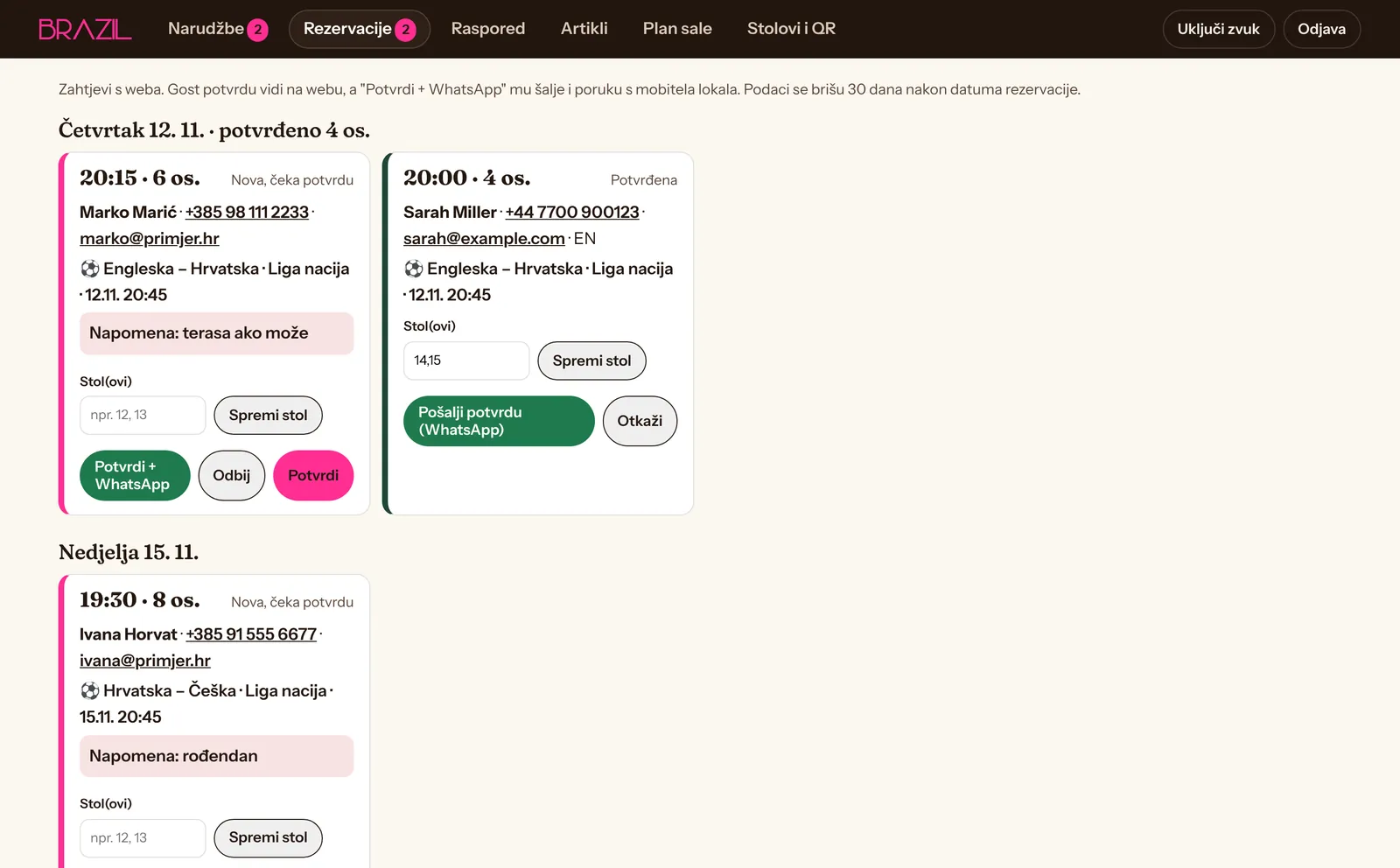
A request from the website, confirmed on WhatsApp
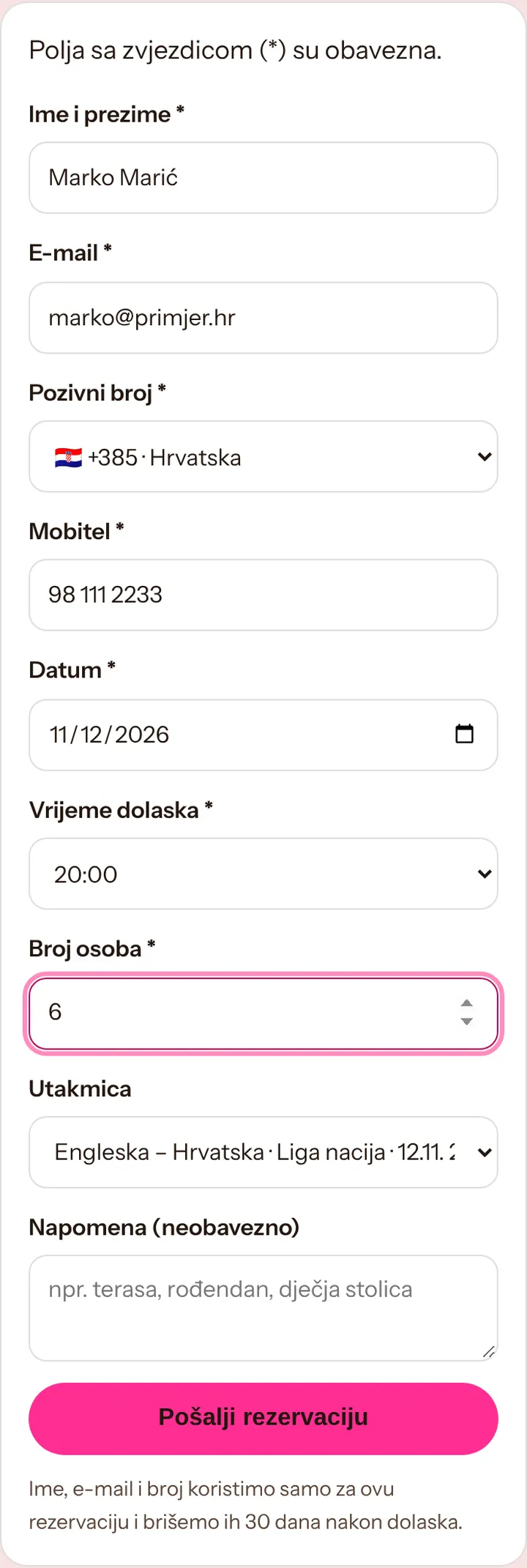
Guests leave their full name, email, mobile number with dialling code, date, time and party size, and for sports bars the match. You confirm and send a message in their language with one click.
Confirm, decline and remind the day before
Tables are assigned to bookings
Data is deleted 30 days after the date
brazildvori.com/admin
Floor plan
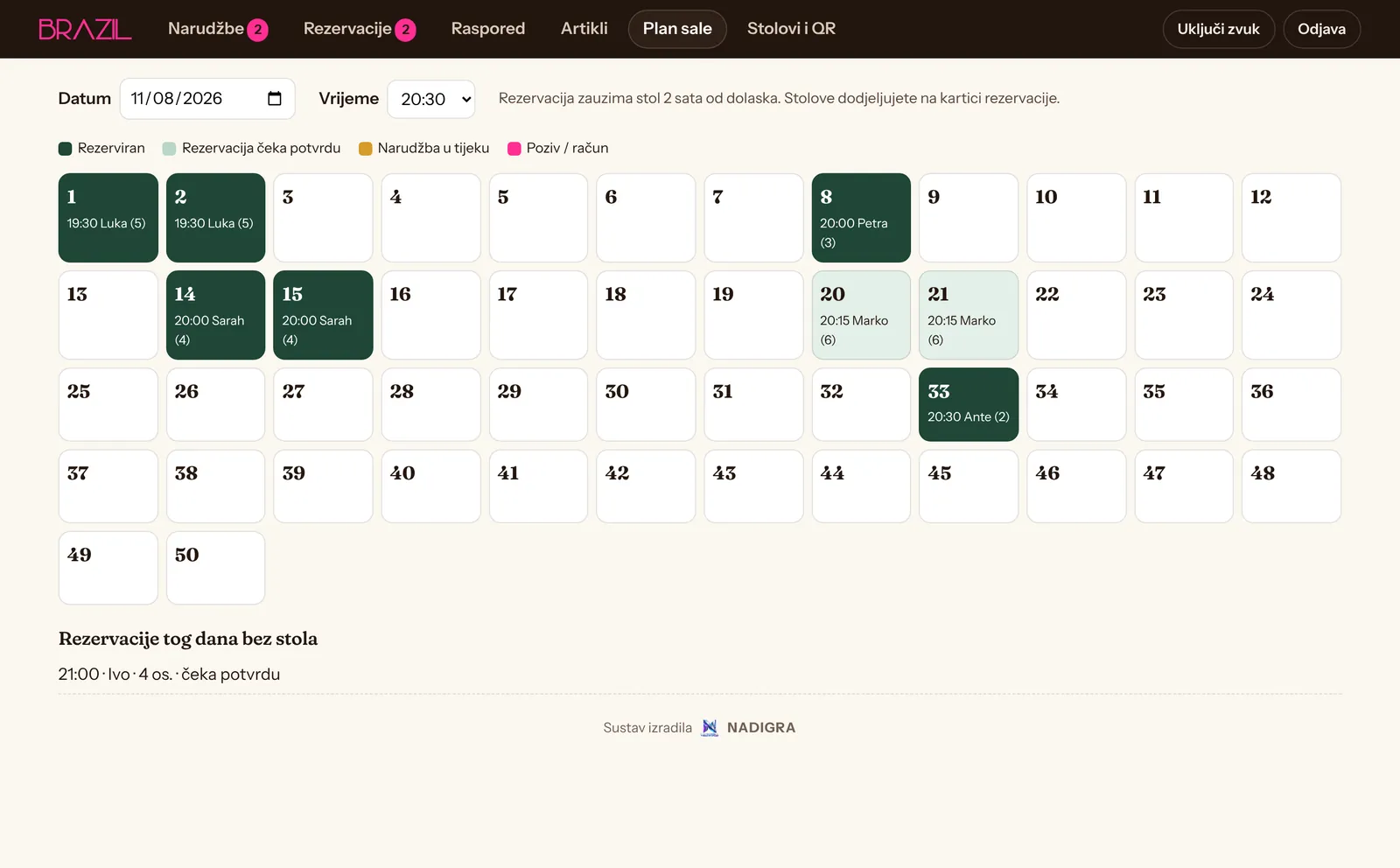
Which table is free at 8:30 pm?
For the selected day and time you see booked tables, those awaiting confirmation and bookings without a table yet. Today you also see orders in progress and calls.
A booking holds a table for two hours
View by day and time
Tables by number, or by your floor sketch on request
brazildvori.com/admin
Staff
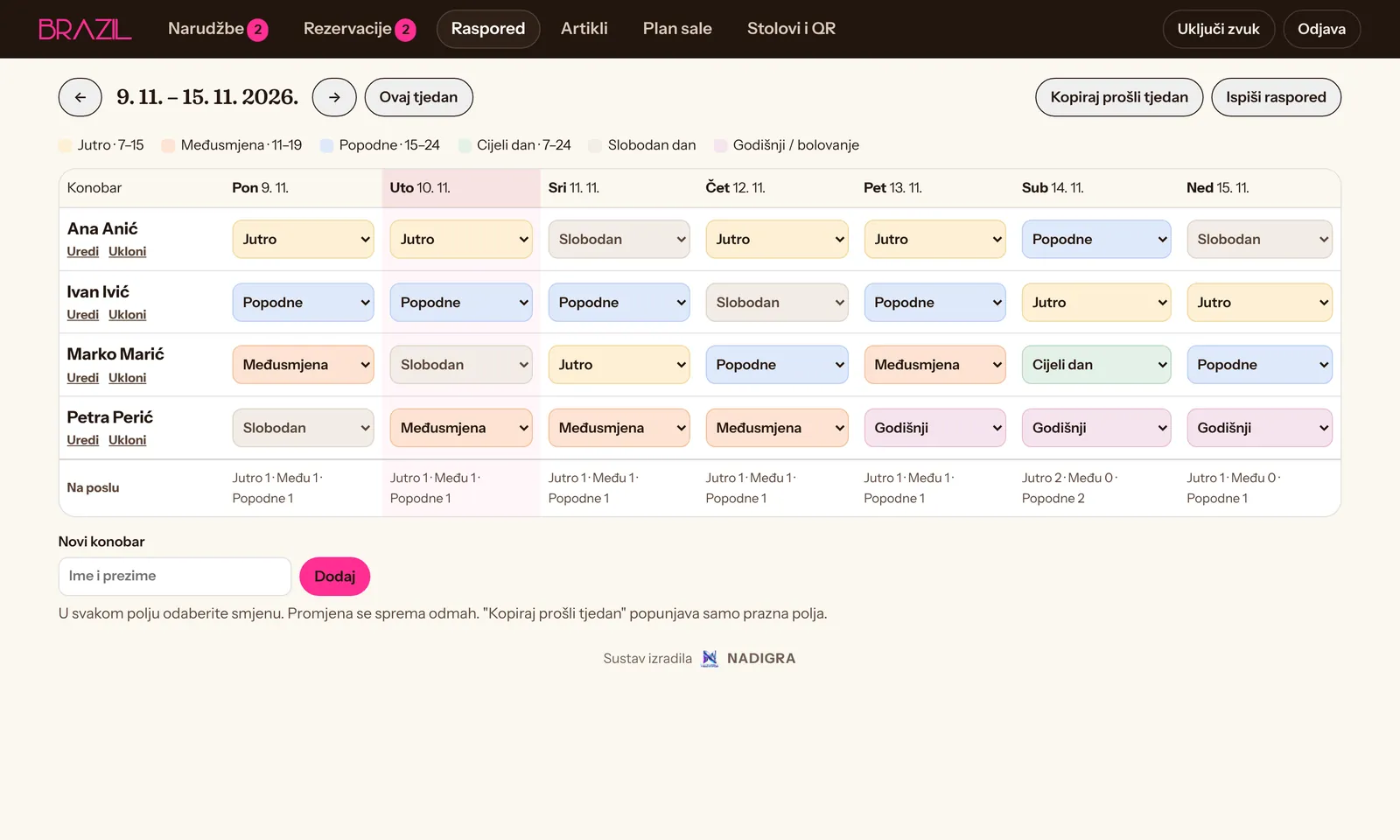
Shift rota without paper
The owner enters the week's shifts and waiters see them on their phones. Last week copies with one click, and the table prints for the notice board.
Morning, mid shift, afternoon, day off, holiday
A warning when a shift has nobody
Day by day on a phone
brazildvori.com/admin
Menu
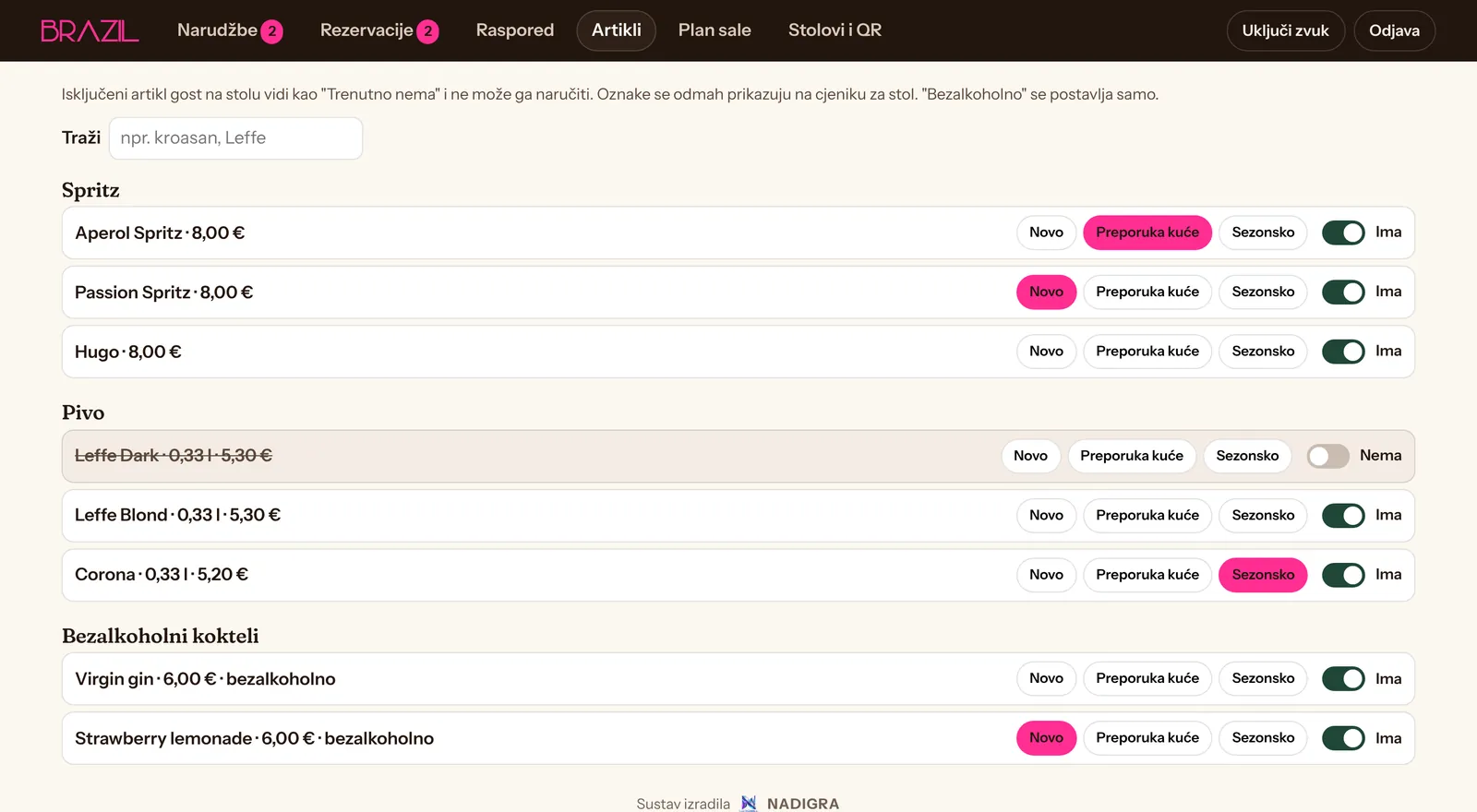
Sold out? One click
Guests see a sold-out item as Not available right now and cannot order it. You add New, House favourite and Seasonal labels the same way.
Search by name
Labels show at once on the QR menu
The menu stays tidy on the website too
brazildvori.com/admin
Tables
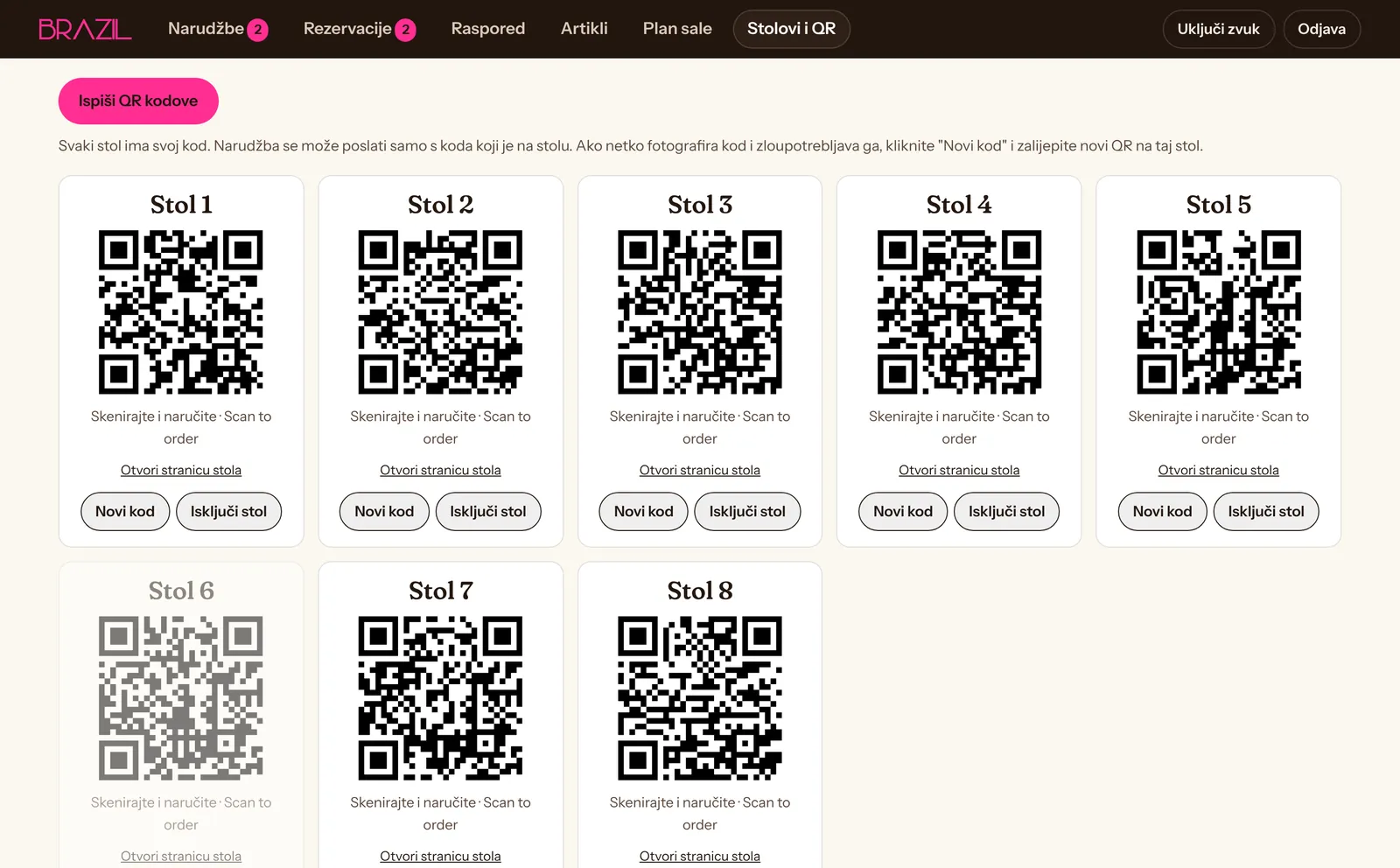
Every table has its own QR code
Print the codes from the admin, two per row, with the table number. If a code is misused, create a new one for that table and the old one stops working.
Orders only from the code on the table
Switch off a single table
Ready to laminate
brazildvori.com/admin
FOR RESTAURANTS AND PIZZERIAS THAT DELIVER
Your own delivery: order, kitchen, driver and tracking
Guests order on your website, not through someone else's platform. The order reaches the kitchen, you assign it to a driver, and the guest follows their food on a map.
1
The guest orders
A menu with photos and extras, a basket, an address with a map pin, a note and payment method. Pick-up at the restaurant works too.
2
The kitchen accepts
The order arrives with a sound and a printout. You accept it and enter an estimated time, and the guest sees the confirmation at once.
3
Preparing
The guest sees Being prepared too. When the order is ready, you assign it to a driver with one click.
4
On the way
The driver sees the address on their phone, opens navigation and shares their location while driving. The guest sees on a map where they are and how long it will take.
5
Delivered
The driver marks Delivered and the order closes. The guest can then be invited to leave a Google review.
ILLUSTRATION · GUEST VIEW
Order #128On the way
Received
Preparing
On the way · 9 min
Delivered
Driver app
Runs in the phone browser, nothing to install. Assigned orders, a call button, navigation and Picked up and Delivered buttons.
Live tracking
The guest and the restaurant see the driver on a map while the delivery is in progress. Location is shared only during delivery and is not stored.
Zones, minimum and delivery fee
Delivery areas, a minimum order and a fee per zone. The system does not accept orders outside the zone.
Pause for rush hours
One switch pauses delivery orders for a while or extends the estimated time.
Payment
Cash or card on delivery. Online card payment is connected by agreement, through a provider you choose.
Delivery overview
How many orders, the average delivery time and takings per day, with no per-order platform commission.
We set up the delivery module around how you work: zones, extras, delivery hours and the number of drivers are agreed before we build.
BENEFITS
Why it pays off
Guests
Order when they want, without waiting for a waiter
The menu in their language, on their own phone
Book a table for a match or a birthday in a minute
Follow their order and delivery
Staff
Less walking: the table calls when it needs something
Orders with table number and note, no mishearing
Printing at the bar and in the kitchen
The rota always on their phone
Owners
More orders per table, especially when busy
Your own delivery channel, with no per-order platform commission
Tidy bookings and a floor plan
A stronger Google profile and more reviews
Who it is for
Cafés and coffee bars
Sports bars
Restaurants and taverns
Pizzerias with delivery
Beach bars
Bistros and fast food
FROM FIRST CALL TO FIRST ORDER
How it works
01
A conversation
Send us your menu, photos and how you work: number of tables, bookings, delivery.
02
Built in 10 days
Website, QR menu, admin and legal pages on your domain. You review everything before launch.
03
QR codes and training
We print the table codes and show your staff how it works in half an hour.
04
Launch and support
After launch we follow the first days, and menu and price changes are part of the subscription.
Included in every package
Domain, info@ email, hosting and HTTPS
Website and QR menu in up to three languages
Google Business Profile
SEO
Bookings confirmed on WhatsApp
Maintenance and menu changes
Not included
Hardware: tablet, printer and table stickers
Google Ads budget
Online card payment provider fees
SMS messages, if you want them instead of WhatsApp
PILOT PROJECT
Pilot: Caffe Bar Brazil, Dubrovnik
The system runs at Caffe Bar Brazil in Dvori Lapad: website, QR ordering on 50 tables, match bookings, staff rota and an admin at the bar.
Tell us whether you run a café, restaurant or pizzeria and what you need: a website, QR menu, table ordering or your own delivery system. A short message is enough to get started.
GOOD TO KNOW
A few clear answers.
Do guests need to install an app?+
No. Guests scan the QR code on the table or open the website, and everything runs in the phone browser. The same goes for drivers.
Can someone order for another table?+
No. Every table has its own code in the QR, and orders are accepted only from the code on that table. The code can be replaced in the admin.
What if we are too busy to watch orders?+
Orders can print by themselves at the bar, and QR ordering can be paused with one switch.
Is delivery included in the price?+
Delivery is part of the System with delivery package, €179 a month: online orders, a driver app and delivery tracking. Online card payment is connected by agreement.
What do the Google profile and SEO include?+
We set up and edit your Google Business Profile: categories, description, opening hours, photos and posts. SEO covers local and technical SEO, titles, descriptions and page structure so guests find you more easily when they search for a café or restaurant nearby. We cannot guarantee rankings.
How is the driver tracked?+
The driver starts the delivery on their phone and their location is shared while the delivery is in progress. The guest and the restaurant then see them on a map. Location is not stored after delivery.
How are bookings confirmed?+
The booking arrives in the admin. Confirm it with one click and WhatsApp opens with a ready message to the guest in their language. You can also send a reminder the day before.
How long does it take?+
The website and system are ready within 10 days of receiving your menu and photos. Payment starts only after you approve the launch.
Is Google Ads included?+
No. Advertising is agreed separately, with a separate ad budget.
Can I change my package later?+
Yes. When you move to a bigger package, we add the tools to your existing website, with no rebuild.
Cookies and measurement
We use necessary storage to run the website. With your consent we also measure visits (analytics) and the results of our Google ads. You can change your choice at any time under Cookie settings in the footer. Cookie policy